View Patron Payment Plans
1 min
Similar to Invoicing, you can see all Payment Plans and their status.
To view these plans, simply select Collections (at the top of your account) -> Payment Plans. From here, you can see and access all payment plans.
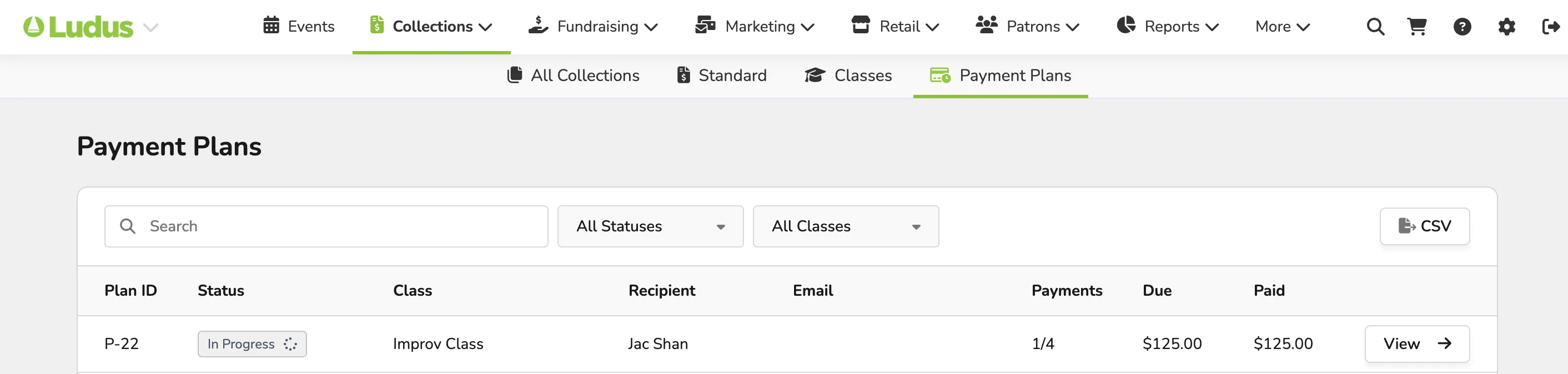
This page will include:
- Plan ID
- Status of the Plan
- In Progress
- Paid
- Payment Failure
- No Payment Method
- Void
- Class
- Which class is the plan for?
- Recipient
- Who is paying for the plan?
- The email of the recipient.
- Payments
- How many payments have they made? For example, if there are 4 payments and they have made 1, it will show as 1/4.
- Due
- Amount still due.
- Paid
- Amount paid to date.
Additionally, you can select View to View a Specific Payment Plan .