Offer Special Pricing for Flex Pass Holders to Events Not Included in the Pass
You can offer a discounted price to Flex Pass holders for tickets to events not covered by the Flex Pass. Usage Example: You have a special event that is not covered by the flex pass, and you want to offer a special price to those pass holders to boost sales.
Here is how to create the special price.
Create a new price term.
Give it a unique name, such as Pass Holder Special Offer.
Enter the price that you wish to offer.
Under Access, select Pass Holders, select the Pass(s) this price should be offered to, and save.
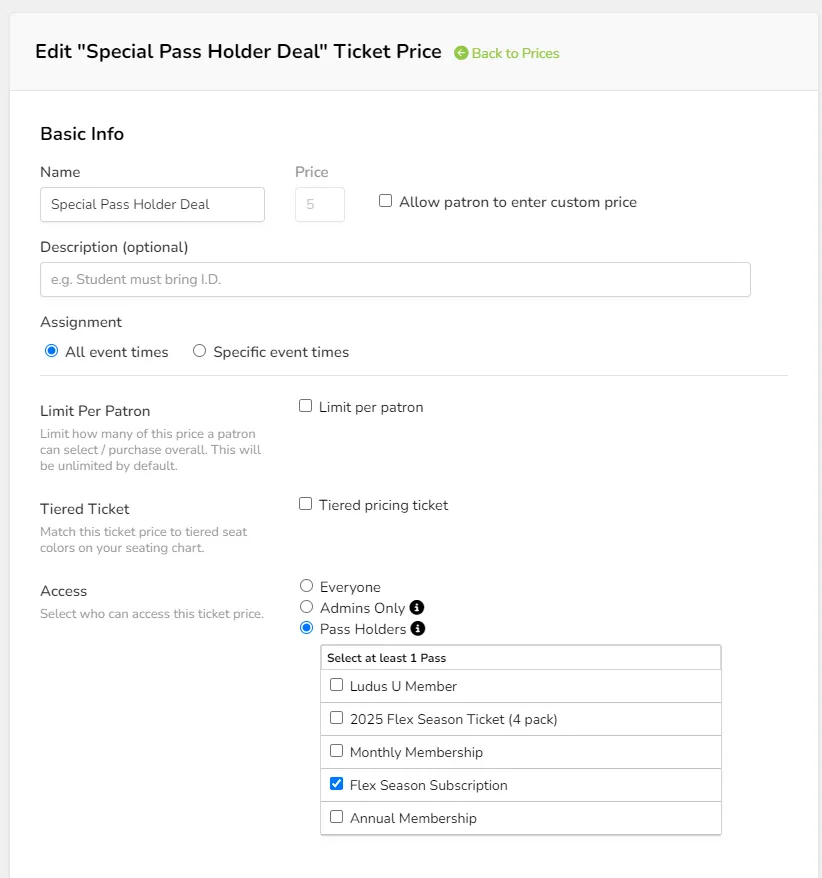
This price will not be limited by the number of passes a patron owns and will not count toward the number of tickets allowed by the pass itself. You can limit the number of tickets that a pass holder can redeem at this special price by using the Limit per patron setting in the pricing setup.
Patrons who log in with the appropriate Flex Pass code will be offered this price, along with any limits you may have set for that price term.